In the BI community we know that the pervasive adaptation of Business Intelligence technology can have a potentially transformative effect on a company's performance, especially when BI is applied with the philosophy of "enabling action from insight." One way OBIEE currently enables action is by providing links from reports directly to the transactional source system for that data so that the end user can take action on transactions related to that data. With OBIEE 11g, Oracle will be bringing actionable insight an evolutionary jump forward with the ability to integrate tightly with BPEL Process Manager.
In this post I'd like to introduce the basic concept behind BPEL and explain its importance in the context of OBIEE.
First it's important to highlight the distinction between transactions and processes. Transactions are important. They are the lifeblood of a busienss. But we all know that a business isn't just a collection of isolated transactions. Instead, we work with processes: For example, if the inventory level for Product X hits a certain threshold, someone has to make a decision about whether to reorder that item. The responsible party typically has one or more process she follows before she takes a business action and these processes are often comprised of both human and systems activities.
Historically the primary role of IT has simply been to support the "tech" side of a business in isolation from the processes that the tech supports. Consequently there has arisen a kind of division -- too often hostility -- between IT and the business it serves. One manifestation of this divide happens when attempting to keep any sort of process documentation: so often, as soon as the documentation is complete it is rendered obsolete. Any kind of documented understanding of the process has little relevance to the process itself, almost to the point that the process Once the documentation is complete.
But as tech becomes more tightly woven into the conduct of our activities, the complexity of the human/tech interactions in any given business process -- and the speed with which these interactions can change -- has likewise grown. Smartly managing and supporting these processes requires a healthy understanding of how the whole system interacts.
Enter BPEL - Business Process Execution Language - an XML-based language developed to describe in a systematic way the orchestration of steps within a business process. It combines the more-or-less "human readable" qualities of XML with the rigor of a real programming language. With BPEL, in a very real sense the processes themselves and the documented description of the processes are one and the same. BPEL is a very powerful way to bridge the business / IT divide: it challenges the business to unambiguously define exactly what they do and it requires IT to implement the tech components to support these activities exactly as described by the business.
Now, BPEL is a unique, "human readable" programming language, but in the end it's just that: a language. It needs a vehicle for executing the instructions defined in the BPEL program. The mechanism for executing these instructions is a BPEL Server, or "Engine." Several BPEL Engine products have been developed over the years, including Oracle's own BPEL Process Manager, which is one component of their SOA Suite.
What does all this have to do with OBIEE? Well imagine the reorder decision scenario above. Instead of simply linking to an inventory management system, OBIEE can let the user initiate the entire reorder evaluation BPEL process directly in BPEL Process Manager - which will in turn invoke other systems and human actions before the final click of the "Reorder" button. Or OBIEE can even invoke the process on its own based on user-defined thresholds, and let the process take its established course.
I have only begun to scratch the surface of exactly what BPEL is or how to use it. I encourage a deeper look into BPEL and the features of Oracle's BPEL Process Manager to truly appreciate the potential application of this technology in a BI implementation. Here are a few good places to start:
Wikipedia entry on BPEL: http://en.wikipedia.org/wiki/Business_Process_Execution_Language
Oracle's BPEL Process Manager http://www.oracle.com/appserver/bpel_home.html
Chapter on Oracle's BPEL Process Manager (from a larger work on BPEL in general)http://www.codeguru.com/cpp/sample_chapter/article.php/c10789
Enjoy...
Friday, July 31, 2009

Thursday, July 30, 2009
Public Sector Workshop - Minneapolis, MN
BI Consulting Group co-hosted a hands-on workshop with Oracle in Minneapolis, MN on July 28. The hands-on workshop was geared towards a Public sector audience and featured customers who have purchased Oracle Business Intelligence Enterprise Edition Plus (OBIEE+) or are evaluating purchasing OBIEE+.
BI Consulting Group presented an overview of OBIEE+ as well as dove into the best practices when developing reports and dashboards as well as explained how to build a successful Public Sector BI Strategy. BICG also presented the workshop portion of the day where students were able to get hands-on experience with Answers. Students learned a lot about how to build Answers queries and how to apply best practices to Answers and dashboards.
For info on workshops and ones that are coming to a city near you, please visit:
Wednesday, July 29, 2009
Deploying OBI Presentation Services on Weblogic
The following are the steps that are required to deploy OBI Presentation Services
1. Create a new WebLogic Server domain using a JDK such as Sun JDK 1.5.x or
higher, in place of JRockit. By opening BEA Weblogic configuration wizard
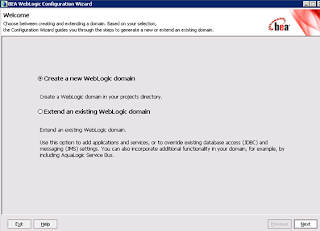
2. Select Generate a Domain configured automatically
3. Configure the Administrator Username and Password
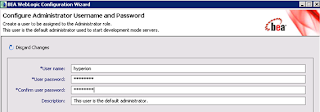
4. Configure the server start mode and JDK under JDK section
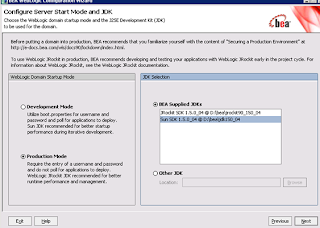
5. Select Yes for customize Environment and Server settings
6. In the Configure Administration Server give a valid name, Listen Address i.e the IP address where the Weblogic Console is hosted, Listen Port
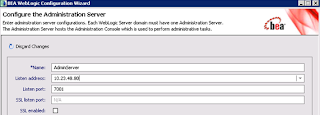
7. Configure Managed Servers. In here specify the name of the OBI Presentation Services Server, Lisen Address which is the IP address, Listen Port typically this may be 7005
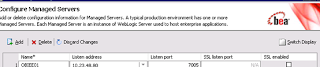
8. Skip configure clusters
9. In configure machines add the name of the machine that hosts weblogic server instance
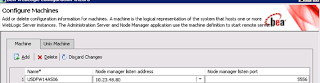
10. Assign server to the machine,review domain configuration then create Weblogic Domain and check for successfull creation of Weblogic Domain
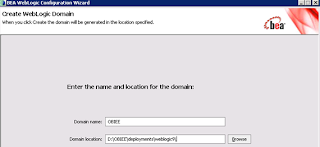
11. Create an exploded archive directory from the analytics.ear or analytics.war file
using the new domain, by following these steps:
a. Copy the analytics.ear or analytics.war file in the \OracleBI\web directory to
a destination directory, as shown in the following example.
-mkdir c:mydestination\BIEE\
-cp c:\OracleBI\web\analytics.war to c:mydestination\BIEE\
b. Manually unpack the analytics.ear or analytics.war file using a jar command,
as shown in the following example.
jar -xvf manual\generic\analytics.war
By running the jar command, you create a directory called "analytics." This is
the directory where the application will be deployed
If the BI Presentation Services Server runs on a different machine from the
WebLogic Server, then edit the web.xml file for the WebLogic Server to account for
this difference.
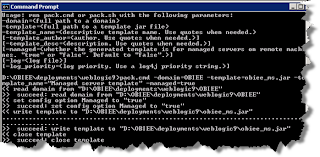
12. In a Web browser, start the WebLogic Administration Console, as shown in the
following example. http://hostname:7001/console
13. If you have not already done so, in the Change Center of the Administration
Console, click Lock & Edit.
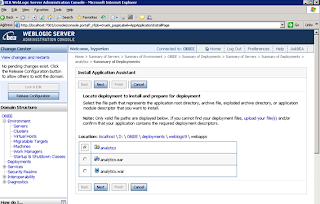
14. In the left pane of the Administration Console, click Deployments.
15. Install the deployment as an application by completing the following steps:
a. In the right pane, click Install.
b. Select c:mydestination\BIEE and click Next.
c. Select Install this deployment as an application and click Next.
d. Select I will make the deployment accessible from the following location for example D:\OBIEE\Deployments\weblogic9\webapps\analytics from Source accessibility in the install application assistant window after selecting the option button for the name of the machine where OBI presentation services are deployed eg: OBIEE01
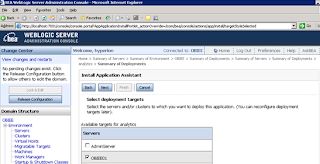
f. Then select option button for Yes take me to deployment screen, then view all screens clickin Next
g. Click Finish.
15. To activate these changes, in the Change Center of the Administration Console,
click Activate Changes.
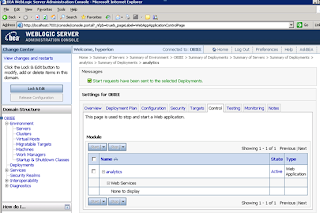
16. Start the service by clicking Deployments, then analytics.
1. Create a new WebLogic Server domain using a JDK such as Sun JDK 1.5.x or
higher, in place of JRockit. By opening BEA Weblogic configuration wizard

2. Select Generate a Domain configured automatically
3. Configure the Administrator Username and Password

4. Configure the server start mode and JDK under JDK section

5. Select Yes for customize Environment and Server settings
6. In the Configure Administration Server give a valid name, Listen Address i.e the IP address where the Weblogic Console is hosted, Listen Port

7. Configure Managed Servers. In here specify the name of the OBI Presentation Services Server, Lisen Address which is the IP address, Listen Port typically this may be 7005

8. Skip configure clusters
9. In configure machines add the name of the machine that hosts weblogic server instance

10. Assign server to the machine,review domain configuration then create Weblogic Domain and check for successfull creation of Weblogic Domain

11. Create an exploded archive directory from the analytics.ear or analytics.war file
using the new domain, by following these steps:
a. Copy the analytics.ear or analytics.war file in the \OracleBI\web directory to
a destination directory, as shown in the following example.
-mkdir c:mydestination\BIEE\
-cp c:\OracleBI\web\analytics.war to c:mydestination\BIEE\
b. Manually unpack the analytics.ear or analytics.war file using a jar command,
as shown in the following example.
jar -xvf manual\generic\analytics.war
By running the jar command, you create a directory called "analytics." This is
the directory where the application will be deployed
If the BI Presentation Services Server runs on a different machine from the
WebLogic Server, then edit the web.xml file for the WebLogic Server to account for
this difference.

12. In a Web browser, start the WebLogic Administration Console, as shown in the
following example. http://hostname:7001/console
13. If you have not already done so, in the Change Center of the Administration
Console, click Lock & Edit.

14. In the left pane of the Administration Console, click Deployments.
15. Install the deployment as an application by completing the following steps:
a. In the right pane, click Install.
b. Select c:mydestination\BIEE and click Next.
c. Select Install this deployment as an application and click Next.
d. Select I will make the deployment accessible from the following location for example D:\OBIEE\Deployments\weblogic9\webapps\analytics from Source accessibility in the install application assistant window after selecting the option button for the name of the machine where OBI presentation services are deployed eg: OBIEE01

f. Then select option button for Yes take me to deployment screen, then view all screens clickin Next
g. Click Finish.
15. To activate these changes, in the Change Center of the Administration Console,
click Activate Changes.
16. Start the service by clicking Deployments, then analytics.

Tuesday, July 28, 2009
Putting Label of the Prompt in Front
If you want to put the Label of the prompts in front of the selection itself (intead of on the top)
1. To do this just for the current dashboard page, add a text frame to your dashboard page and add following content to it
< type="text/css">
td.GFPFilter br { display:none; }
< /style >
Set "Contains HTML Markup" chechkbox.
2. If you want to do this across all pages, edit views.css of the style you are using (S_ directory) and add
td.GFPFilter br { display:none; }
1. To do this just for the current dashboard page, add a text frame to your dashboard page and add following content to it
< type="text/css">
td.GFPFilter br { display:none; }
< /style >
Set "Contains HTML Markup" chechkbox.
2. If you want to do this across all pages, edit views.css of the style you are using (S_ directory) and add
td.GFPFilter br { display:none; }
High Level OBIEE report design strategy
So often an organization will take on the task of installing OBIEE, establishing the infrastructure to support it, and even re-organizing their data appropriately. But when it comes to the actual report design, standards fail to be established, reports and dashboards become awkward and cumbersome, and user adoption suffers.
Since OBIEE is often seen as an Ad-Hoc reporting tool, this problem can often be the result of many developers developing with an Ad-Hoc mentality. The result is mismatched dashboards and confusing layouts. Other times, it’s the result of too many people involved in the development process. Once something gets approved by 15 people in a Power Point mock up, it’s difficult to get changes approved when something doesn’t pan out as expected. As a result, the small imperfections get set aside, but never fail to add up.
The following is a high level list of items to keep in mind when entering the report development stage of any OBIEE project. Keeping each of these items in mind will help you design attractive and useful reports and dashboards, which will ultimately lead to greater user adoption and pervasive use of the tool.
1. Trust your users - If your users don’t use your BI or other technology systems, it’s because they either get no value from it, or the system is too slow. These same users will spend their evenings shopping online and paying bills over the internet. It’s ignorant to believe they can’t use a well designed online reporting tool.
2. Think Insight, not Reports - Take the time to understand what the business user searches for, what they mark up with a yellow highlighter, and what they look at next after discovering an “exception”
3. Move Business Skills into your IT shop, not IT skills into your Business – Make an effort to understand the business needs, and then apply the technology accordingly. Don’t ask the business to “make due” with what IT provides.
4. Design your Dashboard in OBI EE itself using an iterative methodology – Don’t use Power Point to design your reports. Designing directly in OBIEE allows you to know immediately what will and will not work. Plan to make a series of adjustments throughout the design process, using feedback from the business users.
5. Establish a set of standards – If your users can’t derive insight in the first few seconds of looking at a Dashboard, it’s a bad design. This is no longer a world in which IT programmers lead the user’s impression of standards. Amazon, Google, Yahoo!, Apple iPhones, etc. all lead the pack when it comes to quality interfaces and standardized interfaces.
Since OBIEE is often seen as an Ad-Hoc reporting tool, this problem can often be the result of many developers developing with an Ad-Hoc mentality. The result is mismatched dashboards and confusing layouts. Other times, it’s the result of too many people involved in the development process. Once something gets approved by 15 people in a Power Point mock up, it’s difficult to get changes approved when something doesn’t pan out as expected. As a result, the small imperfections get set aside, but never fail to add up.
The following is a high level list of items to keep in mind when entering the report development stage of any OBIEE project. Keeping each of these items in mind will help you design attractive and useful reports and dashboards, which will ultimately lead to greater user adoption and pervasive use of the tool.
1. Trust your users - If your users don’t use your BI or other technology systems, it’s because they either get no value from it, or the system is too slow. These same users will spend their evenings shopping online and paying bills over the internet. It’s ignorant to believe they can’t use a well designed online reporting tool.
2. Think Insight, not Reports - Take the time to understand what the business user searches for, what they mark up with a yellow highlighter, and what they look at next after discovering an “exception”
3. Move Business Skills into your IT shop, not IT skills into your Business – Make an effort to understand the business needs, and then apply the technology accordingly. Don’t ask the business to “make due” with what IT provides.
4. Design your Dashboard in OBI EE itself using an iterative methodology – Don’t use Power Point to design your reports. Designing directly in OBIEE allows you to know immediately what will and will not work. Plan to make a series of adjustments throughout the design process, using feedback from the business users.
5. Establish a set of standards – If your users can’t derive insight in the first few seconds of looking at a Dashboard, it’s a bad design. This is no longer a world in which IT programmers lead the user’s impression of standards. Amazon, Google, Yahoo!, Apple iPhones, etc. all lead the pack when it comes to quality interfaces and standardized interfaces.
Monday, July 27, 2009
Oracle Essbase - Moving Beyond the Finance Department
People sometimes think of Oracle Essbase as only suited for use by the Finance department. While it’s true that Essbase “excels” at this (pun intended), the tool can help almost any business function that uses numeric data. Its ability to analyze data in multidimensional ways allows users to “slice and dice” numbers and gain new insight into what’s happening in their business. Once you see how to do this in one area, why not do the same thing somewhere else? Indeed, the goal should be to increase the value of Essbase in your organization by using it in ways you might not have previously considered. Move it out of the Finance department and make yourself an analytics superstar!
Here are a few areas where savvy users of Oracle Essbase can extend it horizontally across multiple business functions:
• Operations: inventory control, forecast accuracy analysis
• Sales and Marketing: product profitability, marketing spend planning
• HR: compensation trend analysis, timesheet tracking and analysis
• Manufacturing: creating build plans, bill of material (BOM) analysis
• Finance: days sales outstanding (DSO) analysis
Put on your thinking cap, think about how many people outside of Finance use data to accomplish their tasks and come up with Oracle Essbase models to satisfy their needs.
Here are a few areas where savvy users of Oracle Essbase can extend it horizontally across multiple business functions:
• Operations: inventory control, forecast accuracy analysis
• Sales and Marketing: product profitability, marketing spend planning
• HR: compensation trend analysis, timesheet tracking and analysis
• Manufacturing: creating build plans, bill of material (BOM) analysis
• Finance: days sales outstanding (DSO) analysis
Put on your thinking cap, think about how many people outside of Finance use data to accomplish their tasks and come up with Oracle Essbase models to satisfy their needs.
Sunday, July 26, 2009
Leveraging Marketing Analytics to Export Large Files
As a part of a typical OBI implementation some of the business requirements may be handle exporting or downloading large files with size of many million records in different file formats like XLS, CSV. This in general may be planned to use the OOTB Download feature in OBIEE. Well if this is the case then there may be huge performance bottlenecks just leveraging on OBI services withing a browser.
Marketing Analtics may be explored to handle this requirements. Marketing Analytics has the feature to manage export of large files with several formats
Lets look at the configuration steps
1. we need to configure some marketing objects within OBI Repository
2. Lets use the OOTB Marketing Objects for Example Contacts
3. Click Manage --> Marketing within an opened OBI Repository to view existing marketing objects
4. Double click on Contacts Target Level, See the primary qualified item added as Contacts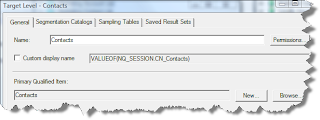
5. In the Segmentation Catalogs Tab. The Customet Profile Segmentation is set as primary segmentaion catalog. In here this customer profile segmentation catalog is actuallya presentation catalog created in OBI Rpd
6. Click on Marketing Contact List List Catalog object which is used to define the list formats for export.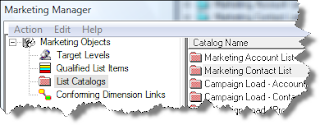
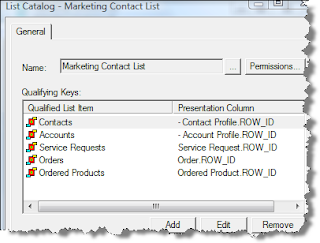
7. Double click on Marketing Contanct List list catalog to see Contacts Qualified List Item is attached with ROW_WID of Contacts
8. Loginto OBI Answers and Click on More Products-->Marketing
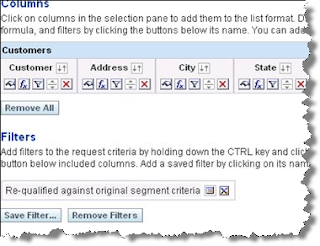
9. Create a list format with the required columns as shown below which are required to be exported and specify the file output format as xls in Options Tab, also check the “Re-qualify list results against original segment criteria” check box to make your list format generic and it works with any segment.
10. Create a simple segment using Contacts target level and attach it with the list format created above (List Preview File Format in the Advanced Options tab).
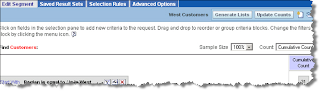
11. Click the Generate Lists button. In the popup dialog you can issue commands to run the list generation or to preview the list.
12. Find the URL of the Preview List Eg: http://bicg026/analytics/saw.dll
?MktgEditExportFormatReport&Action=previewFromSegment&Path=%2Fusers%2Fadministrator%2FCustomer%20List%20for%20Export&SegmentPath=%2Fusers%2Fadministrator%2FWest%20Contacts
13. In the Dashboad designer window add Link Object to embed this URL
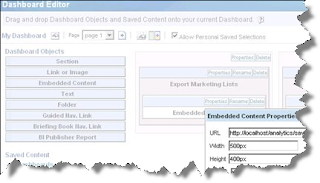
This allows to download the file and save to disk
Marketing Analtics may be explored to handle this requirements. Marketing Analytics has the feature to manage export of large files with several formats
Lets look at the configuration steps
1. we need to configure some marketing objects within OBI Repository
2. Lets use the OOTB Marketing Objects for Example Contacts
3. Click Manage --> Marketing within an opened OBI Repository to view existing marketing objects

4. Double click on Contacts Target Level, See the primary qualified item added as Contacts

5. In the Segmentation Catalogs Tab. The Customet Profile Segmentation is set as primary segmentaion catalog. In here this customer profile segmentation catalog is actuallya presentation catalog created in OBI Rpd

6. Click on Marketing Contact List List Catalog object which is used to define the list formats for export.

7. Double click on Marketing Contanct List list catalog to see Contacts Qualified List Item is attached with ROW_WID of Contacts

8. Loginto OBI Answers and Click on More Products-->Marketing
9. Create a list format with the required columns as shown below which are required to be exported and specify the file output format as xls in Options Tab, also check the “Re-qualify list results against original segment criteria” check box to make your list format generic and it works with any segment.

10. Create a simple segment using Contacts target level and attach it with the list format created above (List Preview File Format in the Advanced Options tab).

11. Click the Generate Lists button. In the popup dialog you can issue commands to run the list generation or to preview the list.
12. Find the URL of the Preview List Eg: http://bicg026/analytics/saw.dll
?MktgEditExportFormatReport&Action=previewFromSegment&Path=%2Fusers%2Fadministrator%2FCustomer%20List%20for%20Export&SegmentPath=%2Fusers%2Fadministrator%2FWest%20Contacts
13. In the Dashboad designer window add Link Object to embed this URL

This allows to download the file and save to disk
Subscribe to:
Comments (Atom)