Showing posts with label Hyperion. Show all posts

Tuesday, December 7, 2010

Integrating Relational Databases with Essbase Studio

Integrating Relational Databases with Essbase Studio


Because relational databases can store several terabytes of data, they offer nearly unlimited scalability. Multidimensional databases, generally smaller than relational databases, offer sophisticated analytic capabilities. By integrating a relational database with an Essbase database, you leverage the scalability of the relational database with the conceptual power of the multidimensional database.


By default, when Essbase Studio creates an Essbase outline, it loads all member levels specified in the metaoutline into a multidimensional database. You can, however, set Essbase Studio to build to a specified member level (Hybrid Analysis) or build only to the dimension level (Advanced Relational Access). Building down to a specified level produces a smaller multidimensional database and a smaller Essbase outline.


A source relational database can be integrated with an Essbase database by using XOLAP (extended online analytic processing). This is a variation on the role of OLAP in business intelligence. Specifically, XOLAP is an Essbase multidimensional database that stores only the outline metadata and retrieves data from a relational database at query time. XOLAP thus integrates with an Essbase database, leveraging the scalability of the relational database with the more sophisticated analytic capabilities of a multidimensional database.


Essbase Studio - Model Development Workflow
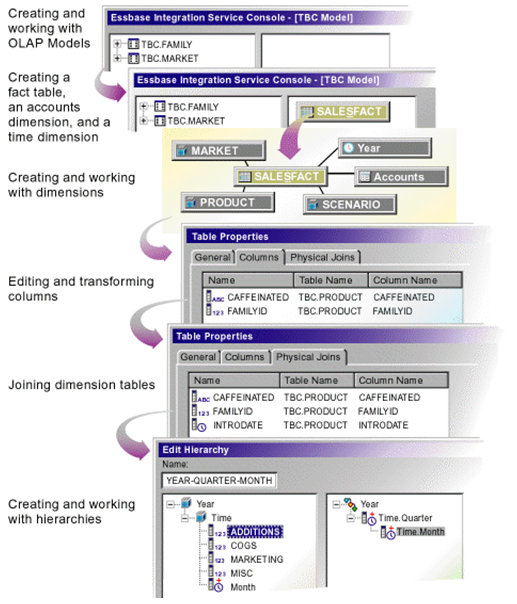


Some XOLAP Specifics


  • XOLAP (extended online analytic processing) is a variation on the role of OLAP in business intelligence. Specifically, XOLAP is an Essbase multidimensional database that stores only the outline metadata and retrieves data from a relational database at query time. XOLAP thus integrates a source relational database with an Essbase database, leveraging the scalability of the relational database with the more sophisticated analytic capabilities of a multidimensional database.

  • OLAP and XOLAP store the metadata outline and the underlying data in different locations:


    • In OLAP, the metadata is located in the Essbase database, and the underlying data is also located in the Essbase database.

    • In XOLAP, the metadata is located in the Essbase database while the underlying data remains in your source relational database.


  • The differences in the locations of the metadata and data are key to understanding how XOLAP can be of benefit because these differences affect the functionality of OLAP and XOLAP.

  • OLAP lends itself to traditional relational data storage and data analysis. XOLAP lends itself to operations supported in mixed or "hybrid" environments such as Hybrid Analysis and Advanced Relational Access (familiar to users of Essbase and Essbase Studio). Many of the basic concepts of Hybrid Analysis and Advanced Relational Access have been folded into the functionality of XOLAP cubes in Oracle Essbase Studio.


XOLAP Workflow
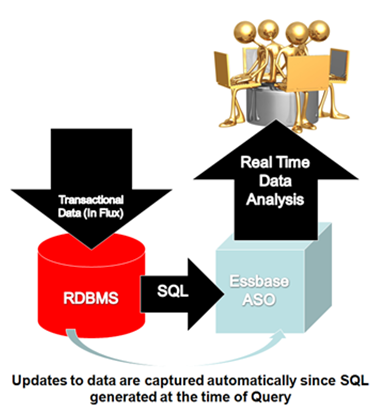


The workflow of data retrieval in an XOLAP environment is much like that of a non-XOLAP environment:


  1. The model is designated as XOLAP-enabled in Essbase Studio.

  2. The cube is deployed in Essbase Studio; however, no data is loaded at that time.

  3. The Essbase database is queried, using Smart View, Oracle Essbase Visual Explorer, or another reporting tool which can access an Essbase database.

  4. Essbase dynamically generates the required SQL to retrieve the data from the source relational database.


Integrating XOLAP with Traditional OLAP Sources
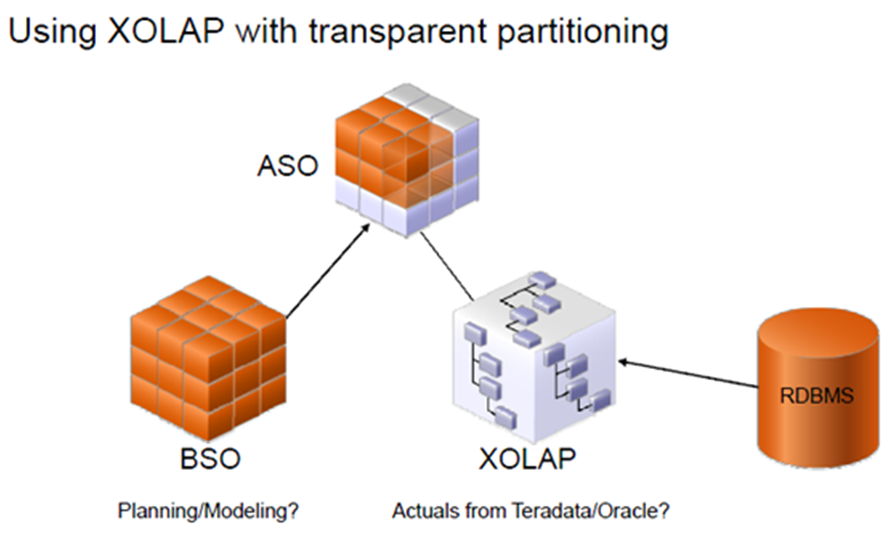


XOLAP has the following restrictions:


  1. No editing of an XOLAP cube is allowed. If you wish to modify an outline, you must, instead, create a new outline in Oracle Essbase Studio. XOLAP operations will not automatically incorporate any changes in the structures and the contents of the dimension tables after an outline is created.

  2. When derived text measures are used in cube schemas to build an Essbase model, XOLAP is not available for the model.

  3. XOLAP can be used only with Aggregate Storage. The database is automatically duplicate-member enabled.

  4. XOLAP supports dimensions that do not have a corresponding schema-mapping in the catalog; however, in such dimensions, only one member can be a stored member.


Usages Not Supported in XOLAP


XOLAP does not support use of the following:


  • Flat files

  • Ragged hierarchies

  • Alternate hierarchies

  • Recursive hierarchies

  • Calendar hierarchies

  • Filters

  • Typed measures

  • User defined members at the leaf level

  • Multiple relational data sources


Hybrid Analysis


Hybrid Analysis eliminates the need to load and store lower-level members and their data within the Essbase database. This feature gives Essbase the ability to operate with almost no practical limitation on outline size and provides for rapid transfer of data between Essbase databases and relational databases.


Hybrid Analysis integrates a relational database with an Essbase multidimensional database so that applications and reporting tools can retrieve data directly from both databases.


Data Flow for Hybrid Analysis
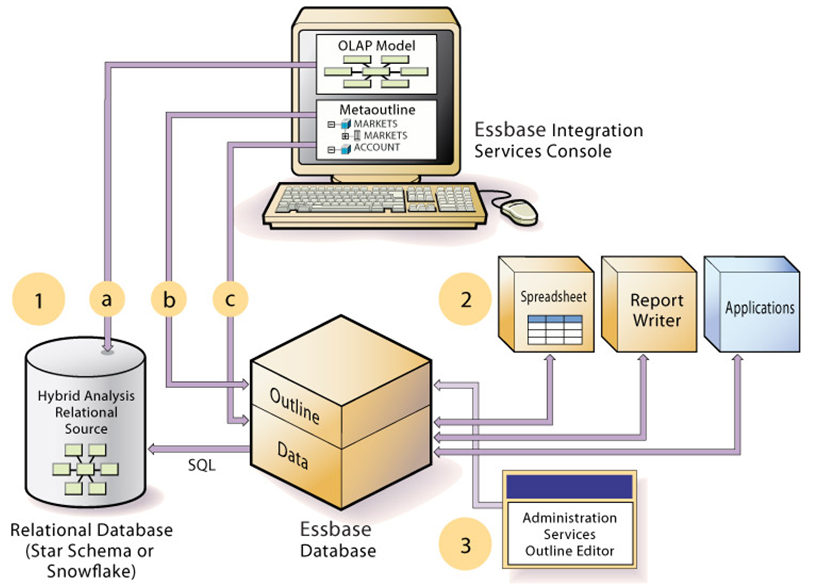


  • The initial step in setting up XOLAP or Hybrid Analysis is to define the relational database as a XOLAP or Hybrid Analysis relational source.


  1. You define the XOLAP or Hybrid Analysis relational source in Essbase Studio. Through Essbase Studio, you first specify the relational data source for the OLAP model. The OLAP model is a schema that you create from tables and columns in the relational database. To build the model, Essbase Studio accesses the star schema of the relational database. Using the model, you define hierarchies and tag levels whose members are to be enabled for Hybrid Analysis. You then build the metaoutline, a template containing the structure and rules for creating the Essbase outline, down to the desired Hybrid Analysis level. The information enabling Hybrid Analysis is stored in the OLAP Metadata Catalog, which describes the nature, source, location, and type of data in the Hybrid Analysis relational source.

  2. Next, you perform a member load, which adds dimensions and members to the Essbase outline. At this point XOLAP databases are complete and can queried by a multitude of reporting tolls.

  3. For Hybrid Analysis databases, when the member load is complete, you must run a data load to populate the Essbase database with data.


  • Applications and reporting tools, such as spreadsheets and Report Writer interfaces, can retrieve data directly from both databases using the dimension and member structure defined in the outline, Essbase determines the location of a member and then retrieves data from either the Essbase database or the Hybrid Analysis relational source if a Hybrid Analysis database and from the relational data source when a XOLAP model is specified.


    • If the data resides in the Hybrid Analysis relational source, Essbase retrieves it through SQL commands.

    • XOLAP also leverages transactional SQL to access data from the fact table at the time the query is initiated by the end user.


  • To modify the outline in Hybrid Analysis, you can use Outline Editor in Administration Services to enable or disable dimensions for Hybrid Analysis on an as-needed basis. Changes to metadata in XOLAP require a complete drop and rebuild of the Application and database through Essbase Studio


Comparison of Aggregate and Block Storage


Since XOLAP only supports the Aggregate Storage Kernel, it is pertinent to highlight the differences in ASO and BSO.


Essbase provides an aggregate storage kernel as a persistence mechanism for multidimensional databases. Aggregate storage databases enable dramatic improvements in both database aggregation time and dimensional scalability. The aggregate storage (ASO) kernel is an alternative to the block storage (BSO) kernel. Aggregate storage databases typically address read-only, "rack and stack" applications that have large dimensionality, such as the following applications:


  • Customer analysis. Data is analyzed from any dimension, and there are potentially millions of customers.

  • Procurement analysis. Many products are tracked across many vendors.

  • Logistics analysis. Near real-time updates of product shipments are provided.


Aggregate storage applications, which differ from block storage applications in concept and design, have limitations that do not apply to block storage applications.


Inherent Differences between ASO and BSO


Inherent DifferencesAggregate StorageBlock Storage
Storage KernelArchitecture that supports rapid aggregation, optimized to support high dimensionality and sparse dataMultiple blocks defined by dense and sparse dimensions and their members, optimized for financial applications
Physical Data StorageThrough the Application Properties window, Tablespaces tab in Administration ServicesThrough the Database Properties window, Storage tab in Administration Services
Databases supported per applicationOneSeveral (one recommended)

Outline Differences with ASO and BSO


Outline FunctionalityAggregate StorageBlock Storage
Multiple hierarchies enabled, dynamic hierarchy, or stored hierarchy designationRelevantIrrelevant
Accounts dimensions and members on dynamic hierarchies

Support with the following exceptions:


• No two-pass calculation


• No association of attribute dimensions with the dimension tagged Accounts


• Additional restrictions for shared members.


Full support
Members on stored hierarchies

Support with the following exceptions:


• Support for the ~ (no consolidation) operator (underneath label-only members only) and the + (addition) operator


• Cannot have formulas


• Restrictions on label only members


• No Dynamic Time Series members


• Stored hierarchy dimensions cannot have shared members. Stored hierarchies within a multiple hierarchies dimension can have shared members.


Full support
Member storage types

Support with the following exceptions:


• Dynamic Calc and Store not relevant


• On stored hierarchies, two limitations if a member is label only:


o All dimension members at the same level as the member must be label only


o The parents of the member must be label only.


Support for all member storage types in all types of dimensions except attribute dimensions

Calculation Differences between ASO and BSO


Calculation Functionality


Aggregate Storage


Block Storage
Database calculation

Aggregation of the database, which can be predefined by defining aggregate views


Calculation script or outline consolidation


Formulas

Allowed with the following restrictions:


Must be valid numeric value expressions written in MDX


No support for Essbase calculation functions


On dynamic hierarchy members, formulas are allowed without further restrictions


Support for Essbase calculation functions


Calculation scripts

Not supported


Supported


Attribute calculations dimension

Support for Sum


Support for Sum, Count, Min, Max, and Average


Calculation order

Member formula calculation order can be defined by the user using the solve order member property


Defined by the user in the outline consolidation order or in a calculation script


Partitioning Differences between ASO and BSO


Partitioning Functionality


Aggregate Storage


Block Storage


Partitioning


Supported with the following restrictions:


No Outline Synchronization


Fully supported

Data Load Differences between ASO and BSO


Data Load FunctionalityAggregate StorageBlock Storage
Cells loaded through data loadsOnly level 0 cells whose values do not depend on formulas in the outline are loadedCells at all levels can be loaded (except Dynamic Calc members)
Update of database valuesAt the end of a data load, if an aggregation exists, the values in the aggregation are recalculatedNo automatic update of values. To update data values, you must execute all necessary calculation scripts.
Data load buffersThe loading of multiple data sources into aggregate storage databases is managed through temporary data load buffers.Not supported
Atomic replacement of the contents of a databaseWhen loading data into an aggregate storage database, you can replace the contents of the database or the contents of all incremental data slices in the database.Not supported
Data slicesAggregate storage databases can contain multiple slices of data. Data slices can be merged.Not supported
Dimension build for shared membersFull support for parent-child build method. Duplicate generation (DUPGEN) build method limited to building alternate hierarchies up to generation 2 (DUPGEN2).Support for all build methods
Loading data mapped to datesIn a date-time dimension, you can load data into level-0 members using supported date-format strings instead of member names.Date-time dimension type is not supported.

Query Differences between ASO and BSO


Query FunctionalityAggregate StorageBlock Storage
Report WriterSupported, except for commands related to sparsity and density of dataFully supported
Spreadsheet Add-inSupported, with limited ability to change data (write-back)Fully supported
APISupportedSupported
Export

Support with the following restrictions:


• Export of level 0 data only (no upper-level export)


• No columnar export


Supported
MDX queriesSupportedSupported
Queries on attribute members that are associated with non-level 0 membersReturns values for descendants of the non-level 0 member.Returns missing for descendants of the non-level 0 member
Queries on attribute members and shared membersA shared member automatically shares the attribute associations of its nonshared memberA shared member does not share the attribute associations of its nonshared member
Query loggingNot SupportedSupported
Query performanceConsiderations when querying data from a dimension that has multiple hierarchies.Hierarchies not relevant

Feature Differences between ASO and BSO


FeatuesAggregate StorageBlock Storage
AliasesSupportedSupported
Currency ConversionNot SupportedSupported
Data MiningNot SupportedSupported
Hybrid AnalysisSupport with the following restriction: queries that contain a relational member and an Essbase member with a formula in the same query are not supported.Supported
Incremental Data LoadSupportedSupported
LROsNot SupportedSupported
Time Balance Reporting

Support with the following restrictions:


• Skip Zeros is not supported


• Time dimension must contain at least one stored hierarchy


• Shared members must be at level zero


Supported
TriggersAfter-update triggers supportedOn-update triggers and after-update triggers supported
UnicodeSupportedSupported
Variance ReportingNot SupportedSupported
Date-time dimension type and linked attribute dimensionsSupportedNot Supported
User ability to change data (write-back)Transparent partition technique used to enable limited write-backFully Supported

Links to Blogs written by BICG on XOLAP


Part 1 of the XOLAP blog


http://oraclebiblog.blogspot.com/2010/02/xolap-virtual-cubes-against-data.html


Part 2 of the XOLAP blog


http://oraclebiblog.blogspot.com/2010/02/xolap-virtual-cubes-against-data_15.html

Friday, March 26, 2010

Which Tool Should Be Used for Reporting?

My clients often wonder which Oracle tool they should use for reporting, building graphs, and generating dashboards. It’s a great question because, as anyone in this realm knows, there are many different options. This blog will touch on the three reporting tools I’m familiar with: Financial Reporting Studio (FRS), Web Analysis (WA), and Oracle Business Intelligence Answers (OBI).

One caveat here is that the bulk of my experience comes from the Oracle Hyperion side, so I have much more familiarity with FRS and WA, and definitely less so with OBI. So, this blog will be written from that perspective.

Below, I’ll give a synopsis of what each tool does, based on my experience, followed by my opinion of when each should be used.

Financial Reporting Studio
FRS is a great tool for producing regular reports, like a monthly reporting package. It allows you to create production level reports with a multitude of formatting options. FRS reports can be viewed in PDF or HTML format, from a client component or over the web. Reports can be gathered together in Books and batch scheduled to run at the frequency of your choosing, and then saved to a particular location or emailed out to a list of users.

FRS is not a tool for producing dashboards, is limited in its chart and graph functionality, and would not generally be used for ad-hoc reporting.

Web Analysis
WA comes from the Hyperion suite of products as the tool for building dashboards. In my experience, it’s most often used to create quick snapshots of data for management or executive level users. WA allows you to create multi-view looks at your critical business metrics, either in graphical or grid format. For example, a dashboard might include a line graph of sales by region in one quadrant, a bar chart of sales by VP in another quadrant, a pie chart of expenses by category, and a grid showing spending by department. WA includes traffic lighting as a feature, allowing you to highlight or color significant variances of data.

WA would not be used for production reporting.

Oracle BI Answers
OBI Answers is a tool for building both reports and dashboards from a variety of sources including relational and multi-dimensional databases. You can build similar dashboards to what WA offers and publish reports similar to what FRS offers. The entire OBI suite has pre-built modules by industry that allow for easier implementation depending on the particular business case.

While OBI Answers can use Oracle Essbase as a data source, there are some issues in doing so that prohibit the use when a particular hierarchy exists. This should be addressed in an upcoming release, but at this point, the OBI link to the Oracle Hyperion suite of products is very limited.

Which Tool?
So, which reporting tool should be used when? With the current releases and functionality available, here is how I would use them:

FRS – Use for regular production reporting such as income statements, operating expenses, headcount, and any other meaningful financial metrics from an Oracle Hyperion data source such as Essbase, Planning, or Financial Management. I generally don’t create charts and graphs using FRS because the options and functionality are fairly limited. But, if you have fairly straightforward and simple chart requirements, then FRS should work fine for you.

WA – I would use Web Analysis for producing grid and chart dashboards from an Oracle Hyperion data source. WA does a good job of incorporating “bells and whistles” that make a dashboard “pop”, providing important metrics quickly.

OBI Answers – OBI is a great tool to use to quickly build reports and dashboards from a data warehouse. In my opinion, this is the easiest tool to learn and use of the three. As I mentioned above, I don’t think it’s currently the right tool to use with Oracle Hyperion data sources, but that very well could change in the near future.

Going Forward
In future releases, I think that OBI will become the tool of choice for reporting and dashboarding, even for Oracle Hyperion data sources. Oracle is very good at creating synergies between their product lines, and while each individual application generally has their own set of tools, eventually, they converge to similar toolset technologies. I think as OBI gets more integrated with the Oracle Hyperion suite of products, it will become the tool of choice for reporting. In my opinion, it is easier to both learn and use compared to both Financial Reporting Studio and Web Analysis.

Friday, March 12, 2010

What skill set should a Hyperion EPM Administrator have? Part I

Working with clients in today’s environment of streamlined resources, one of the areas often overlooked in an EPM implementation is the candidate who is going to fill the role of System Administrator for an organization. There is a direct correlation between the level of success an EPM project has and the candidate fulfilling this all important role.

I’ve been associated with projects where the Administrator has had a less than enthusiastic attitude toward this responsibility; thinking that this is just one more area of responsibility being piled on them. I always try to encourage and communicate that this is an incredible opportunity for them to learn/master a new technology on the job. In addition, the skill set they can acquire through “knowledge-transfer” with the project consultants is invaluable. The portability of this knowledge with future employers is also a benefit that administrators don’t always seem to grasp, as there is a constant need for seasoned Hyperion administrators in the marketplace. Clients consistently inquire as to whether we can assist them in recruiting experienced Hyperion Administrators based on our network of contacts.

Some of the skills from an implementation perspective that we as a project team like to see in an Administrator is a willingness to embrace the technology that’s being implemented Successful Administrators are the ones who jump in to the “deep-end” of the pool with the consulting team and understand that there may be some hiccups along the way, but ultimately the organization will be in a significantly better place once the project has gone “Live”. A consistent theme to those who are resistant to change is how their current legacy systems can handle can adequately handle the organizations requirements, however when questioned a little deeper about the limitations and issues of their current system and how that platform can position the organization for future growth, that’s when the realization of the shortcomings of the current are truly recognized.

The ability to effectively communicate is another critical skill that a successful Administrator must have because they will need to have the ability to speak to different audiences. Success administrators need to be able to communicate with their peers as users and often times users from different parts of the organization outside the familiar confines of the Finance area. In addition, successful Administrators need the ability to effectively communicate with Manager, Director, Vice President level employees. The Administrator must also be able to effectively communicate with the IT group as they will be the liaison between the business side and the technical side of the organizations. Each of these groups has their own “language” and vested interest in the organization which must be recognized by the Administrator in order to be successful.

Much of skill set that successful Administrators need is technical in nature but too often the “people” side is under emphasized. Overall, a good attitude with the ability to effectively communicate at various levels within the organization as well as the technical aptitude to learn a new technology are the ingredients for a successful administrator.

In Part II, we’ll discuss some of the more technical skills that a Hyperion Administrator should either have or acquire in order to be an effective and successful administrator.

Tips and hints relating to the development of Financial Reporting Studio reports – Tip 1

In this installment of my blog contributions I would like to focus on some techniques that I have leveraged to get through some of the more challenging aspects of reports development.


While the function builder for member selection often allows you to get the detail selection that is needed I have found instances where I have had to become creative to achieve the exact detail that was necessary within the report being developed.


Four approaches that I leverage quite frequently are:

  1. Selecting Multiple Members Based on Criteria
  2. Defining Member Lists
  3. Referencing separate data sources within the same grid
  4. Using multiple grids and hiding all but one in the final product

Selecting Multiple Members Based on Criteria

You can select members dynamically based on user-defined criteria. You define criteria by creating expressions of members, Boolean operations, and commands. Boolean operators enable you to specify precise member combinations for the report, which is useful for dealing with large volumes of data. Use the AND, OR, UNION, and NOT Boolean operators, combined with expression commands, to refine your member selections.


For demonstration sake, lets assume you need to include all level 0 children of "Software/Other" but none of these members parents within the report. It is also necessary that when a new level 0 member is added that the report dynamically picks this member up.


To select multiple members based on criteria for this need I perform the following:


  1. Double-click a dimension cell for which you want to assign members.

  2. In the Select Members dialog box, right-click inside the selected area, then click Advanced.

  3. Build the expression to satisfy the above need by 1st selecting the descendants of "Software/Other"

  4. Next toggle the Select Member pane to "Lists" and select "Level 0, Product "

  5. Now update the operator to "AND"

  6. Now render the report in Print Preview, the objective has been obtained

  7. Explore other functions:
  • Select NOT to add the Boolean operator NOT to the expression. NOT is the inverse of the selected condition.
  • Type a left parenthesis, (, to add an opening character to the expression.
  • Type a right parenthesis, ), to add a closing character to the expression.
  • Click in the OPERATOR column, then select AND, OR, or UNION.
  • When all conditions must be met, use the AND operator.
  • When one condition of several must be met, use the OR operator.
  • To combine the data, use the UNION operator.

In the next installment we will cover "Defining Member Lists."

Friday, February 26, 2010

The Impact of IFRS for EPM Reporting – Part 6

In Part 6, I want to provide more detail on the similarities and differences for reporting Financial Instruments. The details below were from notes I took during a presentation during a company sponsored educational seminar about IFRS.


Financial Instruments


Similarities

Both require financial instruments to be classified into specific categories to determine measurement

Both require the recognition of all derivatives on the balance sheet

Hedge accounting is permitted under both

Both require detailed disclosures in the footnotes Differences

Fair value measurement

  • US GAAP – one measurement model (FAS 157) based on exit price
  • IFRS – various standards use slightly varying wording to define fair value – transaction price at inception date is generally considered fair value

Use of fair value option

  • US GAAP – financial instruments can be measured at fair value with changes in income
  • IFRS – financial instruments can be measured at fair value with changes in income, when certain criteria (more restrictive) are met


Differences

Day one profits

  • US GAAP – can recognize day one gains on financial instruments even when all inputs to the measurement model are not observable
  • IFRS – only recognized when all inputs are observable

Debt vs. equity classification

  • US GAAP – certain instruments with characteristics of both debt and equity must be classified as liabilities
  • IFRS – classification focuses on the contractual obligation

Compound (hybrid) financial instruments

  • US GAAP – not bifurcated into debt and equity components, but may be bifurcated into debt and derivative components
  • IFRS – required to be split into a debt and equity component, and if applicable a derivative component

Hedge effectiveness – short cut method

  • US GAAP – permitted
  • IFRS – not permitted

Hedging a component of a risk in a financial instrument

  • US GAAP – risk components that may be hedged are specifically defined – no additional flexibility
  • IFRS – allows entities to hedge components of risk that give rise to changes in fair value

Impairment recognition – available for sale debt instrument

  • US GAAP – may have an impairment due solely to a change in interest rate if the entity does not have the positive ability and intent to hold the asset
  • IFRS – generally only evidence of a credit default results in impairment of an AFS debt instrument


Convergence

In 2007, the IASB exposed a discussion paper to propose one measurement model for fair value whenever fair value is required. This paper was consistent with the concepts in FAS 157. Both boards appear to be moving towards ultimately measuring all financial instruments at fair value with changes in fair value reported through income.

Thursday, February 18, 2010

The Impact of IFRS for EPM Reporting – Part 5

In Part 5, I want to provide more detail on the similarities and differences regarding Assets: intangible assets, long-term assets, impairment of assets and Leases. The details below were from a presentation during a company sponsored educational seminar about IFRS.


Intangible Assets

Similarities

Same definition: nonmonetary assets without physical substance

Recognition criteria require that there be probable future economic benefits and costs that can be reliably measured

Start up costs are never capitalized as intangible assets

Goodwill only recognized in business combinations

Internal costs related to the research phase of R&D are expensed

Amortize over the useful life

Goodwill never amortized


Differences

Development costs

  • US GAAP – expensed, some software developed for internal use can be capitalized (SOP 98-1)
  • IFRS – can be capitalized when technical and economic feasibility can be demonstrated. No separate guidance addressing computer software

Revaluation

  • US GAAP – not permitted
  • IFRS – permitted, but reference to an active market required, therefore, rare


Property, plant and equipment

Similarities

Costs to be capitalized are similar

Both require a provision for asset retirement costs when there is a legal obligation, although IFRS requires provision in certain other circumstances as well

Depreciate on a systematic basis

Assets held for sale are measured at lower of carrying amount or fair value less costs to sell

Differences

Revaluation

  • US GAAP – not permitted
  • IFRS – may be applied to an entire class of assets to fair value

Capitalization of borrowing costs

  • US GAAP – generally, capitalize. Can include certain equity method investments
  • IFRS – policy choice: capitalize or expense, but must be consistent to all. Equity method investments are not qualifying assets. (NOTE: choice will be eliminated in 2009, when the costs must be capitalized)

Investment property

  • US GAAP – not separately defined, so accounted for as held for use or held for sale
  • IFRS – defined as an asset held to earn rent or for capital appreciation. May be accounted for at cost or at fair value


Impairment of Assets

Similarities

Similarly defined impairment indicators

Both require goodwill and intangibles with indefinite lives to be reviewed annually for impairment

Despite similarity in overall objectives, differences exist in the way in which impairment is reviewed, recognized and measured

Differences

Review for impairment indicators – long-term assets

  • US GAAP – whenever events or changes in circumstances indicate
  • IFRS – assessed at each reporting date

Method of determining impairment

  • US GAAP – 2 step approach – determine recoverability, then loss
  • IFRS – one step approach – calculate loss if indicators exist

Impairment loss calculation

  • US GAAP – Amount carrying amount exceeds fair value (FAS 157)
  • IFRS – Amount carrying amount exceeds its recoverable amount

Goodwill

  • US GAAP – recoverability test first at the reporting unit level, then calculate loss
  • IFRS – impairment test at the cash generating unit level

Reversal of loss

  • US GAAP – prohibited
  • IFRS – prohibited for goodwill. Other long-term assets reviewed annually for reversal indicators


Leases

Similarities

Party that bears substantially all of the risks/rewards of ownership recognizes a lease asset and corresponding obligation (capital lease)

  • US GAAP has bright line tests, IFRS doesn’t – but generally follows the US GAAP test

Operating leases expense recognized straight line over lease term

Lessor accounting essentially the same


Differences

Lease of land and building

  • US GAAP – if fair value of land is greater than 25% of the total fair value – consider the land and building components separately
  • IFRS – land and building elements considered separately – no 25% test

Recognition of a gain/loss on a sale and leaseback

  • US GAAP – gain or loss is generally deferred and amortized over the lease term
  • IFRS – For an operating lease, the gain/loss is recognized immediately. For a capital lease, the gain/loss is deferred and amortized over the lease term
  • IFRS does not have a leveraged lease classification