Showing posts with label OBIEE 11g. Show all posts

Thursday, January 27, 2011

Working with the Master-Detail Report Feature of OBI 11g (pt. 1)

One of the new features included in OBI 11g is the Master-Detail linking feature. The Master-Detail linking allows you to establish a relationship between 2 or more views; one view is called the Master and will drive changes in 1 or more views called detail views.

You can think of a Master-Detail relationship in a similar manner that you would when navigating from 1 report to another works, but you do not lose sight of the master view.

So, how do we implement a Master-Detail link?

We start out by defining an analysis that will be used to create the master view. Here we have created a simple analysis and filtered for Year = 2008.


Now we want to configure this analysis so that we can create our master view. We will select the “Per Name Qtr” column as the data driver; so, we open the Column Properties window of this column and move to the Interaction tab.


Here we select the “Send Master-Detail Events” under the Value Primary Interaction. Once you select this option a secondary edit box labeled “Specify channel” will be made available. You can enter any unique identifier in this box. For our example, we have entered “MDS2”.

Unlike some interaction options like Action Links” which is available on both Column Heading and Value, the Master-Detail option is only available on the Value. This has to do with how a Master-Detail link functions. The value of the cell you click on is passed to the detail view(s); thus, a column heading cannot be used.


We now navigate to Results and create the view we want as our Master view. Here we are using a simple tabular view. Notice that our “Per Name Qtr” values do not show the typical hyperlink that you would expect from the time dimension column.


Now we need to create a detailed view that will listen to events from our master view. To do this, we will add an additional graphical view from the same analysis. Our graphical view will look at Revenue by Brand with our Quarter values placed into a view slider.


With our graphical view in edit mode, we need to open the properties window.


One of the properties available to us is the “Listen to Master-Detail Events” checkbox. By checking this box, we can define this view to be a detailed view for the event channel we want. In our case, we will enter the value “MDS2” as our event channel which is the same value we defined on the “Per Name Qtr” column properties which is our data driver on the master view.

We want to validate our Master-Detail report is working as expected. We will do this by placing the compound layout on to a dashboard page. I have edited the compound layout so that my views, master and detail, are side-by-side. When you click on a cell under the “Per Name Qtr”; such as, “2008 Q2” on the tabular master view, the secondary detail view (graph) accepts the Qtr value and the slider automatically moves to the selected value.


We will continue to explore the Master-Detail link by looking at more advanced features of this link in my next entry.

Tuesday, November 23, 2010

OBIEE 11g Certification Available

Oracle tends to work hard to ensure that best practices are adhered to when working with their products. They even go as far to offer certifications which acknowledge one's ability to demonstrate product knowledge and acuity for implementing, developing, etc. with Oracle products. The release of OBIEE 11g is no exception, and Oracle has recently released the OBI 11g Certification Exam for those so inclined and ready to be stamped as an OBI 11g guru.

This certification holds some similar exam topics to that of its predecessor certification exam for the 10.1.3.x OBI version. But clearly with OBI 11g there are many new areas on which to be tested. Reading over the OBI 11g Exam certification topics one can get a good feel for what Oracle thinks are "must have" areas within the new application to focus on. Even if not taking the exam, learning these topics should provide an administrator, developer, or super-user with keen insight to working with and implementing OBI 11g.

The OB 11g Oracle certification is currently only available for Oracle partners. However, whether you gearing up for the OBI 11g exam or just needing to get educated on OBI 11g, BI Consulting Group has already released several OBI 11g training courses via their BICG University education center on the following topics:

# OBIEE 11-301: Dashboard/Report Application Development
# OBIEE 11-401: Repository/Metadata App Dev
# OBIEE 11-402: Server Architecture

In conclusion, I have always been a fan of official certifications as they show that one took the initiative to learn the information, was grilled on that information via examination, and knew the material well enough to achieve certification status. To me, this is only one or two steps below taking the time to write a book on the topic in question - guru status.

Do you think Oracle certifications are worthwhile?
How has an Oracle certification the helped you in the past?
Should Oracle offer a public OBI 11g certification?

Friday, November 19, 2010

An OBI 11g Client Tools Only Install Work-Around

OBI 11g has been out for several months now and it is getting great reviews - As it should! It is a clean and powerful upgrade from its 10g predecessor. With that being said, many things have changed, not only from a graphical end-user perspective but from a foundation and architecture one as well. This post is specifically discussing the later. Even more specifically, this post touches on what is probably the loudest complaint of System Integrators thus far which is that OBI 11g does not have a client tools install like OBI 10g did. What does this mean OBI 11g integrators and developers? It means that basically anytime one needs to leverage the Administration Tool, Catalog Manager, etc. on a client workstation (away from the OBI Server, i.e.: client/server interaction) the workstation must be loaded with all binaries and configurations as if it was to be the OBI 11g server itself. Oracle's documentation goes on to say that after a full install (Simple or Enterprise) on a client workstation (Windows only, of course) that one must shutdown and disable all server related Windows Services. Clearly this is cumbersome to say the least just to get client tools loaded.

To workaround this one can conduct the OBI 11g installation on a certified client OS using the Software Only Install option. This option requires that a Fusion Middleware Home already be established. So, WebLogic 10.3.3 must be installed on the client machine prior to conducting the OBI 11g Software Only installation. You may download from here or from the Oracle e-delivery site.

If you attempt to conduct the software only install without prior installation of the WebLogic Server you will be confronted with the following error messages (INST-07407, INST-07247):


Once the WebLogic Server has been installed on the client OS, install OBI 11g using the Software Only option. The installation should complete without incident as only the binaries are installed on the client machine. Once the install completes, navigate to the administration tool executable now under the path <fmw_home>\Oracle_BI1\bifoundation\server\bin\admintool.exe.

Please note that the administration tool and all OBIEE 11g client tools are certified to run on a 32-bit OS only. Be warned that the client tools will install onto a 64-bit machine but Oracle currently will not support that version OS if something goes wrong. Please see this link for the current OBI 11g certification matrix, here (OBI 11g Release 1) or here for the full Full Fusion Middleware Certification Matrices. Take note that this is an OBI 11g Client Tools Only Install Work-Around and it is not-officially supported by Oracle But, it is much more efficient than the extra steps per the Oracle documentation.

References
https://support.oracle.com/CSP/main/article?cmd=show&type=NOT&id=1186342.1

Wednesday, November 10, 2010

Cool New Feature in OBIEE 11g: Master-Detail Linking

A few weeks ago, I was fortunate enough to attend an OBIEE 11g workshop given by Oracle. There were so many cool, new features to be found in this new release of OBI, but one of them that seemed really slick was called Master-Detail Linking.

In a nutshell, you can create an analysis (report) with multiple different views and have the views dynamically change as you click on values from another view. Here’s an example of how to accomplish this:

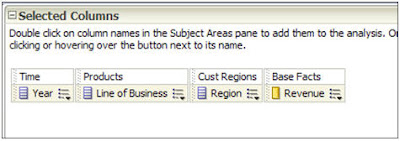
1. Create a new Analysis and add some columns of interest:


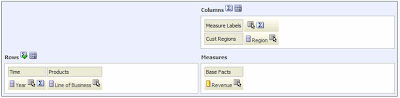
2. View the results and add a pivot table view. Edit the pivot table by moving Region to Columns, and add a Grand Total to the Rows:

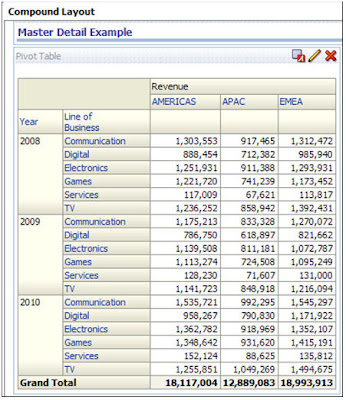
3. Now, my compound layout looks like this:

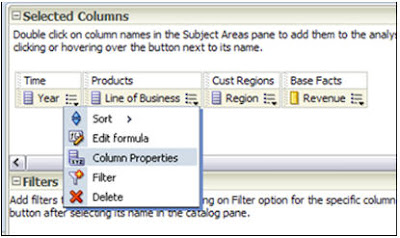
4. Go to the criteria tab, and select the properties of one of your dimensions. I’ll choose Year:

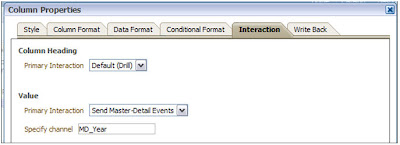
5. Go to the Interaction tab, and under Primary Interaction, select ‘Send Master-Detail Events’. Under Specify Channel, you must give it a name. It doesn’t matter what… just remember it for later. I like to use MD_ (for Master Detail) and then the column I’m using.

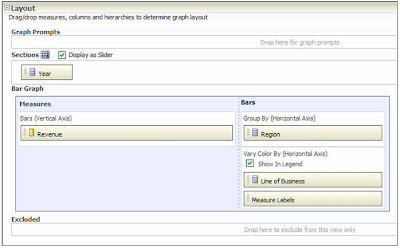
6. Go to the results tab, and add a vertical bar graph. Edit the graph by moving Year to Sections and check the ‘Display as Slider’ checkbox. To make my graph more interesting and easier to read, I’m going to move Line of Business down to ‘Vary by Color’.

7. Click on the graph properties icon:

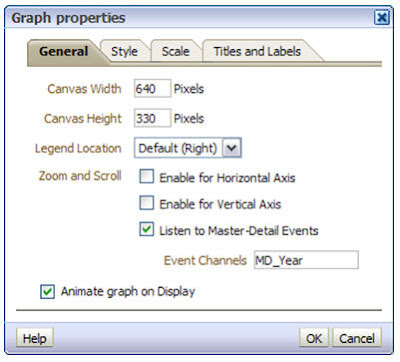
8. On the General tab, check the box labeled ‘Listen to Master-Detail Events’. Be sure type in the Event Channel that you created earlier.

9. Back at the Compound Layout, click the preview icon:


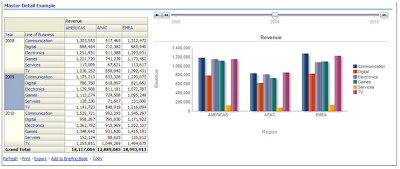
10. Click on the various years displayed in your pivot table. Your graph will dynamically refresh according to the year your clicked on the pivot table and a neat, animated fashion! Very cool!


11. Things to keep in mind: A map view can be the Master, but never the Detail. All other views can be either the Master or the Detail.

Friday, October 15, 2010

OBIEE 11g Architecture

In this article we will briefly explain the new OBIEE 11g architecture and its components. At first glance it seems complex to understand all the new pieces in OBIEE 11g, but let us take a look at the following picture:

We can identify two main component types the OBIEE 11g: The A) Java Components and the B) System Components.

A) Java Components: These are basically J2EE applications running in Weblogic Server. There are two subcomponents here: 1. Admin Server and 2. Managed Server. Each of them running in a dedicated Java virtual machine (JVM).
  1. Admin Server: This is nothing more than a set of J2EE applications that will help us Administering the system:
  • Admin Console (WLS) — An adminstrative user interface that provides advanced management for Weblogic, JEE components, and security
  • Fusion Middleware Control — An administrative user interface that is used to manage the BI domain.
  • JMX MBeans — Java components that provide programmatic access for managing a BI domain.
  1. Managed Server: These are J2EE applications which will help the functioning of the BIEE System (highlighted in RED):
  • BI Plugin — It routes HTTP and SOAP requests to BI Presentation Services.
  • BI Security — It enables the integration of BIEE Server and Fusion Middleware security platform through webservices calls.

  • BI Action Services — It provides the dedicated Web services that are required by the Action Framework (a nice introduction can be found here, another example of use is here and here) and that enable an administrator to manually configure which Web service directories can be browsed by users when they create actions.

  • Webservices SOA — This component provides Web services for objects in the BIEE Presentation Catalog, to invoke analysis, agents, and conditions.

  • BI Office — This component provides the integration between Oracle Business Intelligence and Microsoft Office products.

and finally
  • Two particular applications: BI Publisher (Reporting System) and RTD (technology platform which enable the analysis of data and provides insight by using data mining algorithms and techniques in real time).
B) System Components: These are non-J2EE components, such as processes and services written in C++ and java.
  • BI Server — It provides capabilities to query and access data as well as services for accessing and managing the RPD file (BIEE Metadata).

  • BI Presentation Services — It provides the framework and interface for the presentation of business intelligence data to Web clients. It maintains an Oracle BI Presentation Catalog service on the file system for the customization of this presentation framework.

  • BI Scheduler — Provides extensible scheduling for analyses to be delivered to users at specified times. (BI Publisher has its own scheduler.)

  • BI JavaHost — It enables BI Presentation Services to support various components: Java tasks for BI Scheduler, BI Publisher, and Graph generation.

  • BI Cluster Controller — It distributes requests to the BI Server, ensuring requests are evenly load-balanced across all BI Server process instances in the BI domain.

In addition, the BI Domain requires a set of configuration files, the repository (RPD) file, the Presentation Catalog files, etc. Likewise, BIEE System uses a set of metadata tables stored in a relational database like Oracle.

How to Start BIEE System: There are multiple ways to start the BIEE System, but it must follow certain order. Based on the description given above we need to :

1. Start NodeManager : By default in Windows it runs when the OS starts (Reference about NodeManager can be found here)
2. Start Admin Server : Initiate Weblogic Server.
3. Start Managed Server : Initiate the main applications. Based on the picture above, these are highlighted in Red : BI Plugin, BI Security, BI Action Service, BI Webservices SOA. If you are planning to use BI Publisher or RTD then it must also be started.
4. Start BIEE Services : These are the main BIEE processes which are controlled by OPMN: BI Server, BI Presentation Server, BI JavaHost. If you are planning to use BI Scheduler then also start it. Or if your instance is a clustered environment then also start the BI Cluster Controller.

In our next post, we will describe how to actually perform this operation and we will describe how to troubleshoot issues by looking at the log files.

References:
1. Introduction to BIEE Administration (here).
2. Rittman Mead posts on Action Services (here).

Friday, July 23, 2010

Impressions of the Oracle BI 11g Launch in New York

Hats off to Oracle for doing a great job on the much anticipated launch of OBIEE 11g. Dennis Busby (BICG) and I were fortunate enough to attend the launch event in New York on July 20 with approximately 300 other people.


The session started with Tony Fernicola kicking off the launch from one of the buildings that make up the Lincoln Center campus. The theater featured an amazing view of Central Park and the Manhattan skyline. Tony set the stage discussing the history of BI at Oracle as well as Oracle’s vision for business intelligence in the future.

The OBIEE 11G release is instrumental to Oracle’s BI vision as it does a great job of integrating OBIEE with additional Oracle technologies including Hyperion Essbase, Oracle Enterprise Manager, Oracle WebCenter and WebLogic (to name a few).

Paul Rodwick and David Granholm then served as co-presenters for the North American release of OBIEE 11g. They grouped the content into 4 different categories that included ROLAP, MOLAP, BI Publishing, and Collaboration. During the presentation, Rodwick and Granholm provided views of the interface design and of the enterprise approach to the architecture. Both presenters did a very nice job showing off Oracle's new business intelligence suite in a way that I felt highlighted the cababilities around OBIEE 11g.


BI Consulting Group has been an integral part of the beta process. BICG's OBIEE 11g Task Force members, consisting of 15 BICG consultants and managers, are working daily on dissecting the OBIEE 11g beta release to ensure we continue to be the most knowledgeable Oracle Business Intelligence experts in the world. Our OBIEE 11g Task Force has been doing a great job on providing beta feedback to Oracle as well as paving the way for BICG to guide and help our customers who plan on embarking on their own OBIEE 11g initiatives.

To ensure we are continually providing proper guidance to our customers and partners around Oracle BI 11g, BICG will be announcing new topics for our BICG Webinar Series that will feature BICG's OBIEE 11g Task Force and focus on the key questions our customers are asking about 11g. Our OBIEE 11g Task Force is also in the process of scheduling Free OBIEE 11g Hands-On Workshops across North America to allow customers and prospects an important hands on experience!

I truly believe the new capabilities of Oracle Business Intelligence 11g will allow organizations to better meet their strategic enterprise business intelligence-related goals . I am most excited to start thinking creatively around best practice usage of collaboration, action framework and the Hyperion Essbase integration as these new features will be game-changers throughout the entire BI space.

Upcoming BICG Webinar Series Events

Leveraging XOLAP and Hybrid Analysis for Increase Performance and Real-time Analytics
July 27, 2010, 1pm-2pm ET

The first chapter of many BICG Webinar Series chapters to focus on Oracle BI 11g. BICG's OBIEE 11g Task Force will simplify the 100's of enhancements and new functionality in the new release.
August 31st, 2010, 1pm-2pm ET


Thursday, June 3, 2010

OBIEE 11g launch in London July 7th, 2010

Well, it seems that OBIEE 11g will be officially launched in London on 7th July, YES this 2010 :)
Here is the invitation to such event in the Oracle site:

Launch Event: Introducing Oracle Business Intelligence Enterprise Edition 11g